Databricks vs. Snowflake: How to Choose the Right Platform in 2026
Choosing between Databricks and Snowflake is one of the most consequential decisions a data team will make this year — and it’s not the binary choice most articles make it out to be.
We say that with some authority. Blue Orange Digital is a certified consulting partner for both Databricks and Snowflake, and we’ve spent years designing, implementing, and optimizing architectures on each platform across industries like financial services, healthcare, retail, and private equity. We’ve seen where each one excels, where each one struggles, and — increasingly — where the right answer is to use both.
This guide is built from that implementation experience, not from spec sheets or vendor marketing. If you’re searching for a thorough Databricks vs Snowflake comparison — one that goes beyond surface-level feature lists — the framework below will help you make a decision grounded in real-world performance, cost, and strategic fit.
Quick Comparison: Databricks vs. Snowflake at a Glance
Before we go deep, here’s the high-level picture across the dimensions that matter most in enterprise data platform decisions.
| Dimension | Databricks | Snowflake |
|---|---|---|
| Core Architecture | Lakehouse (unified data lake + warehouse on open formats) | Cloud-native data warehouse with multi-cluster shared data |
| Storage Model | Open formats (Delta Lake, Iceberg, Parquet) on your cloud storage | Proprietary managed storage with Iceberg support added |
| Compute Model | Spark clusters, serverless SQL, and serverless workspaces | Virtual warehouses with auto-suspend and auto-scale |
| AI/ML Capabilities | Native — MLflow, Mosaic AI, model serving, feature store, managed MCP servers | Growing — Cortex AI suite (Analyst, Search, Agents), Cortex Code, Snowpark ML |
| Data Governance | Unity Catalog (centralized governance, lineage, quality rules) | Horizon (access policies, data masking, object tagging, lineage) |
| Data Sharing | Delta Sharing (open protocol) | Snowflake Marketplace and direct data sharing |
| Ease of Use | Steeper learning curve; powerful for technical users | Lower barrier to entry; SQL-first experience |
| Real-Time / Streaming | Native Structured Streaming with Apache Spark | Snowpipe Streaming, dynamic tables, limited native streaming |
| Pricing Model | DBUs (consumption-based, per workload type) + cloud infrastructure | Credits (consumption-based, per warehouse size and runtime) |
| Scalability | Elastic clusters for petabyte-scale workloads | Auto-scaling virtual warehouses with near-instant scaling |
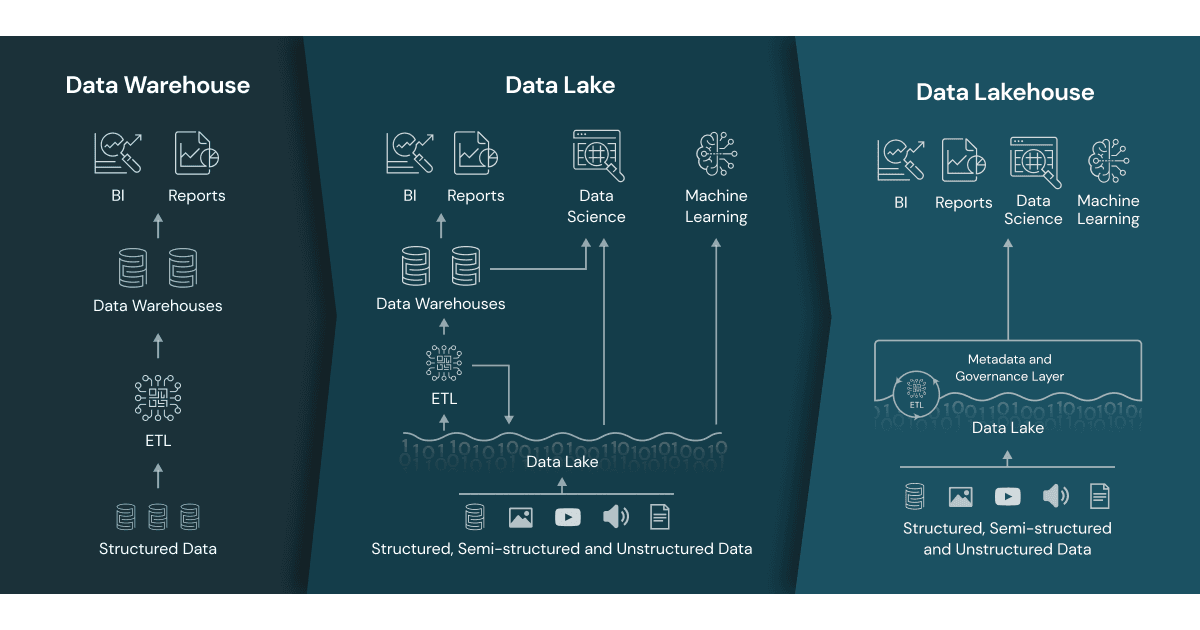
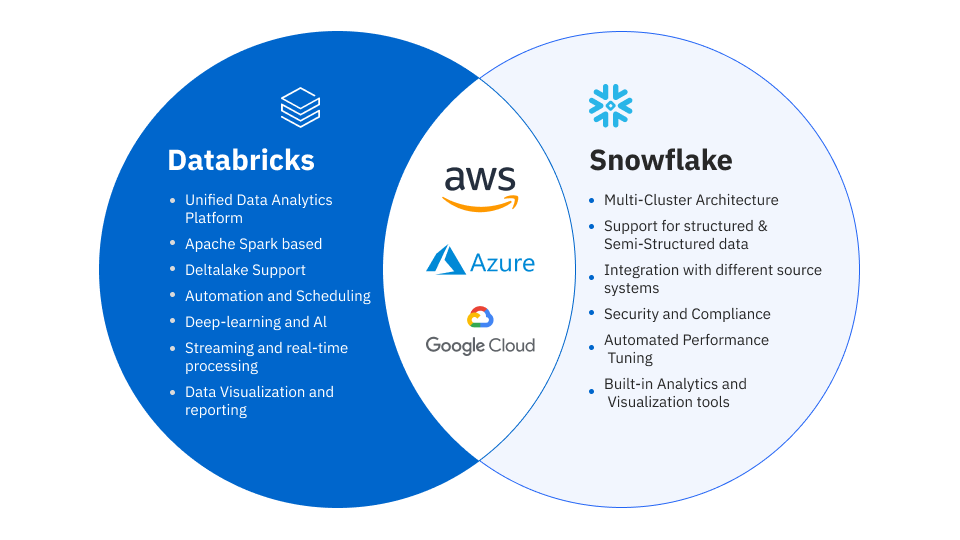
Both platforms run on AWS, Azure, and GCP. Both separate storage from compute. Both are converging toward each other’s strengths. But the architectures underneath remain fundamentally different — and understanding the distinction between data lakehouse vs data warehouse is essential to choosing the right fit. Those architectural differences determine where each platform delivers the most value.
When to Choose Databricks
Databricks is the stronger choice when your data strategy is oriented around machine learning, data science, or complex engineering workloads. Here’s where it consistently wins in the engagements we deliver.
Machine learning and AI-first organizations. If your team is building, training, and deploying ML models as a core business function, Databricks was designed for this workflow. The platform offers integrated experiment tracking through MLflow, a production-grade feature store, GPU-optimized clusters, and — as of early 2026 — managed MCP servers that allow AI agents to securely connect to Databricks resources and external APIs. The January 2026 release of Databricks Runtime 18.0 with its Machine Learning variant further cements its position as the go-to platform for production ML.
Unstructured and semi-structured data at scale. The lakehouse architecture is purpose-built for environments where data arrives in many formats: JSON, images, logs, sensor data, documents. Databricks stores everything on open formats (Delta Lake, Apache Iceberg) in your own cloud storage, eliminating the need to transform data before it can be useful. For organizations where 60–80% of their data is unstructured, this is a decisive advantage.
Streaming and real-time analytics. Databricks’ foundation on Apache Spark gives it native streaming capabilities that go well beyond what Snowflake offers today. The new “trigger on update” feature — now generally available in 2026 — allows pipeline schedules to refresh automatically when a source table changes, enabling event-driven architectures without external orchestration.
Data engineering at scale. If your team manages hundreds of pipelines, complex DAGs, and petabyte-scale transformations, the Databricks ecosystem (Lakeflow, Delta Live Tables, and the newly GA Lakeflow jobs system tables) provides deeper control and observability than Snowflake’s pipeline tooling.
Open-format strategy. If avoiding vendor lock-in is a strategic priority, Databricks’ commitment to open formats (Delta Lake, Iceberg, Parquet) and open-source tools (Apache Spark, MLflow) means your data remains portable. You own the storage, and your formats are readable by any compatible engine.
When to Choose Snowflake
If you’re wondering whether to use Snowflake or Databricks for analytics, the answer often hinges on how SQL-centric your team is. Snowflake is the stronger choice when your priority is analytics, business intelligence, and getting value from structured data quickly. It’s where we consistently see the fastest time-to-insight for BI-centric organizations.
SQL-centric analytics and BI. If your organization’s primary consumers are analysts, BI developers, and business users running queries in tools like Tableau, Looker, or Power BI, Snowflake’s SQL-first architecture delivers an experience that’s hard to beat. The optimizer is exceptional, concurrency handling through multi-cluster warehouses is seamless, and the learning curve is gentler than Databricks for SQL-native teams.
Data sharing and collaboration. No platform matches Snowflake’s data sharing capabilities. The Snowflake Marketplace lets you discover and share live, governed data sets across organizations without copying data. For industries like financial services, healthcare, and media where data partnerships are strategic, this is a significant differentiator.
Rapid deployment and simplicity. Snowflake’s fully managed architecture means near-zero infrastructure management. There are no clusters to configure, no Spark settings to tune, and no cloud storage to provision separately. For teams that want to move fast without deep platform engineering expertise, Snowflake gets you to production faster.
Growing AI capabilities with Cortex. Snowflake’s AI story has matured rapidly. The Cortex AI suite — now including Cortex Analyst (natural language to SQL), Cortex Search (AI-powered unstructured search), and Cortex Agents (multi-capability orchestration) — brings AI functionality directly into the Snowflake environment. The February 2026 launch of Cortex Code, a Snowflake-native AI coding agent, adds natural language development for data pipelines and analytics. It’s not at parity with Databricks for ML engineering, but for organizations that want AI-augmented analytics without building a separate ML platform, it’s compelling.
Operational and transactional workloads. With the general availability of Snowflake Postgres (built on the Crunchy Data acquisition), Snowflake now supports PostgreSQL-compatible OLTP workloads natively. Similarly, Databricks launched Lakebase (its own managed PostgreSQL-compatible database) in early 2026. Both platforms are pushing into transactional territory, but Snowflake Postgres benefits from years of PostgreSQL ecosystem maturity.
When to Use Both (The “And” Scenario)
Here’s what the vendor comparisons won’t tell you: for many enterprise data architectures, the right answer isn’t Databricks or Snowflake — it’s Databricks and Snowflake.
We’ve designed and implemented dual-platform architectures for clients where the workload requirements genuinely demand both. The pattern typically looks like this: Databricks serves as the data engineering and data science layer, handling ingestion, transformation, feature engineering, and model training on the lakehouse. Snowflake serves as the analytics and BI layer, providing the performant, governed SQL interface that business users and analysts consume.
This isn’t redundancy — it’s specialization. The cost of running both platforms is often lower than the cost of forcing one platform to do everything poorly.
When dual-platform makes sense:
Your data science team needs GPU clusters, streaming, and Python-native workflows (Databricks), while your analytics team needs fast SQL queries, BI tool integrations, and data sharing (Snowflake). You have a data lakehouse strategy for raw and semi-structured data, but your finance and executive teams need structured reporting with enterprise governance. You’re migrating from a legacy warehouse and want to modernize your engineering layer without disrupting existing BI dashboards.
The key to making a dual-platform architecture work is clear data contracts, consistent governance (both platforms now support Apache Iceberg as a bridge format), and a consulting partner who understands both ecosystems well enough to avoid unnecessary duplication.
The Blue Orange Decision Framework
After dozens of platform selection engagements, we’ve distilled the decision into five questions. Your answers will point you toward the right architecture.
Question 1: What is your primary workload?
If it’s machine learning, data science, or complex data engineering → lean Databricks. If it’s SQL analytics, BI reporting, or data sharing → lean Snowflake. If it’s both → consider a dual-platform architecture.
Question 2: How much of your data is unstructured or semi-structured?
If more than 40% of your data is unstructured (documents, images, logs, JSON) → Databricks’ lakehouse architecture handles this natively. If your data is predominantly structured and tabular → Snowflake’s columnar warehouse excels.
Question 3: Do you need real-time or streaming analytics?
If yes → Databricks’ native Spark Streaming and event-driven pipelines are significantly more mature. Snowflake’s streaming capabilities (Snowpipe Streaming, dynamic tables) are improving but still more limited for complex streaming use cases.
Question 4: How mature is your team’s engineering capability?
If you have experienced data engineers and data scientists comfortable with Python, Spark, and infrastructure → Databricks gives them more power and flexibility. If your team is SQL-first with less infrastructure experience → Snowflake’s managed environment reduces operational burden.
Question 5: Is vendor lock-in a strategic concern?
If yes → Databricks’ open-format approach (Delta Lake, Iceberg, Parquet on your cloud storage) gives you more portability. Snowflake stores data in a proprietary internal format, though Iceberg support has reduced this concern. Evaluate how important data portability is relative to ease of use.
Cost Comparison: DBUs vs. Credits
Both platforms use consumption-based pricing, but the mechanics differ in ways that significantly impact total cost of ownership.
Databricks pricing is measured in Databricks Units (DBUs), billed per second. DBU rates vary by workload type: interactive development on All-Purpose Compute runs $0.40–$0.55 per DBU, while production Jobs Compute runs around $0.15 per DBU — a 3–4x difference for the same workload. Critically, Databricks has a dual billing structure: you pay Databricks for DBUs and your cloud provider for the underlying compute and storage. Teams routinely underestimate total costs because cloud infrastructure expenses can equal 50–200% of the DBU charges. If someone quotes you $1,000/month in DBUs, budget $2,000–$3,000 for the full picture. Commitment discounts of 20%+ are available for 1- or 3-year prepaid agreements.
Snowflake pricing is measured in credits, also billed per second (with a 60-second minimum). On-demand credit costs range from $2–$4 per credit depending on your edition (Standard, Enterprise, or Business Critical), and prepaid annual commitments bring this to $1.50–$2.50 per credit. Virtual warehouse sizes determine credit consumption: an X-Small warehouse uses 1 credit/hour, and each size up doubles consumption up to 128 credits/hour for 6X-Large. Storage is billed separately at roughly $23/TB/month on AWS, though Snowflake’s compression typically reduces your raw data footprint by 3–5x. Snowflake’s pricing is simpler to predict, but auto-clustering, Time Travel retention, and poorly optimized queries are common sources of cost surprises.
The TCO takeaway: Databricks often has a lower per-compute-unit cost for heavy engineering and ML workloads, but the dual billing structure makes budgeting harder. Snowflake is more predictable and simpler to manage, but can become expensive at scale if warehouse sizing and concurrency aren’t carefully tuned. In both cases, a partner who understands optimization levers — like switching to Jobs Compute on Databricks or right-sizing warehouses on Snowflake — can reduce costs by 30–60%.
What’s New in 2026: Platform Updates That Matter
Both platforms have shipped significant updates in early 2026. Here are the changes most relevant to a platform decision.
Databricks 2026 highlights:
Lakebase, Databricks’ managed PostgreSQL-compatible OLTP database, is now generally available, signaling a push into transactional workloads alongside analytics. Managed MCP servers (public preview) enable AI agents to securely connect to Databricks resources and external APIs — a meaningful development for teams building agentic AI applications. Serverless workspaces are now GA, reducing cluster management overhead. Unity Catalog continues to strengthen with data quality expectations stored directly in catalog tables, centralized pipeline configuration management, and expanded lineage coverage including Genie spaces. Databricks Runtime 18.0 (including the ML variant) reached GA in January 2026.
Snowflake 2026 highlights:
Cortex Code, a Snowflake-native AI coding agent, launched in February 2026 with both in-platform (Snowsight) and CLI modes. Unlike generic coding assistants, it understands your schemas, permissions, query history, and governance policies. Snowflake Postgres reached general availability, bringing PostgreSQL-compatible transactional workloads into the Snowflake platform. Agentic web search via Brave Search API (public preview) enables Snowflake Intelligence and Cortex Agents to incorporate real-time web context. Enhanced Workspaces and Shared Notebooks are now GA, improving team collaboration for development workflows.
A note on the broader ecosystem: Neither platform exists in isolation. Both integrate with popular tools like dbt for transformation, Fivetran and Airbyte for ingestion, and Terraform for infrastructure-as-code. Your existing investments in these tools may influence your platform choice — for instance, dbt Cloud’s native Databricks and Snowflake adapters work well on both, but teams with heavy dbt usage sometimes find Snowflake’s SQL-native environment a more natural fit, while teams using Spark-based frameworks lean toward Databricks.
Both platforms are converging: Databricks is improving its SQL and BI experience, Snowflake is expanding its engineering and AI capabilities. But the core architectures — data lakehouse vs data warehouse — still define where each platform shines.
Making the Decision: What We Recommend
After years of implementing both platforms across dozens of enterprise engagements, here’s what we tell our clients:
Choose the platform that best fits your primary workload, not the one that checks the most boxes on a feature comparison. Databricks is the right platform for organizations where data science, ML, and engineering are the core value drivers. Snowflake is the right platform for organizations where analytics, BI, and data collaboration are the core value drivers. And for organizations with mature, diverse data needs — which describes an increasing number of enterprises in 2026 — a well-architected dual-platform strategy often delivers better outcomes than forcing a single platform to do everything.
So which is better, Databricks or Snowflake? The honest answer is: it depends entirely on your workloads, your team, and your data strategy. The wrong choice here isn’t picking one platform over the other. The wrong choice is making this decision based on a vendor pitch instead of an honest assessment of your team’s capabilities, your data profile, and your business priorities.
Still not sure which platform is right for your organization? As a Databricks and Snowflake consulting partner with deep implementation experience on both platforms, Blue Orange Digital has helped companies across financial services, healthcare, retail, and private equity design and implement the right data architecture for their needs. We’ll assess your current stack, map your workloads, and recommend the architecture that delivers the best performance, cost efficiency, and strategic fit.
Get a free 30-minute data strategy call →
Blue Orange Digital is a certified consulting partner for Databricks, Snowflake, AWS, and Azure. We’ve been recognized on the 2024 MAD (Machine Learning, AI & Data) Landscape and deliver modern data engineering, analytics, and AI solutions with outcome-based pricing and 3–4x faster delivery than traditional consulting.
Related Resources: