

When I started building AI agents to run our own company, my instinct was simple: give them more. More tools, more data, more systems they could act on. A more connected agent is a more useful agent. That's how it looks from the outside, and in a demo it's true.
So that's what I built. We started on something we called Helm AI, which became Paperclip, an open-source platform for running teams of AI agents. I built a set of MCP servers so agents could reach our CRM, our prospecting data, our meeting notes, email, documents and our spend platform. (MCP is the standard plug that lets an AI model work inside another app.) I ran an executive assistant agent on OpenClaw, a self-hosted assistant that takes real actions on your behalf.
It worked, in the sense that it could do almost anything. That turned out to be the problem.
Every workflow I added made the same system more capable and harder to reason about. The question I kept struggling to answer was a basic one: what is this agent allowed to do right now? When the honest answer is "most things, except what we've remembered to block," you're running on trust, not design.
So I went the other way. I tested every layer I could get my hands on: the AI built into everyday tools, single agents built by developers, and full orchestration platforms. I moved real workflows between them, some more than once. This post is what I learned, and the framework we now use at Blue Orange to decide where each piece of work belongs.
Power and access are two different dials#
Access is what an agent can touch. Capability is what it can do with what it touches. I used to treat them as one dial and turn it all the way up. They're separate, and for most work, access should stay low while capability goes high.
Think about hiring someone new. You can give them keys to every system on day one and write a policy listing what they're not allowed to do. Or you can give them access to the three systems their job needs and train them deeply on those three. The first person can do more. The second is safer, easier to supervise and, inside their lane, usually better at the job.
Agents work the same way, with one difference. They don't get tired, they don't hesitate, and they act at machine speed. So the cost of the first approach shows up much faster.
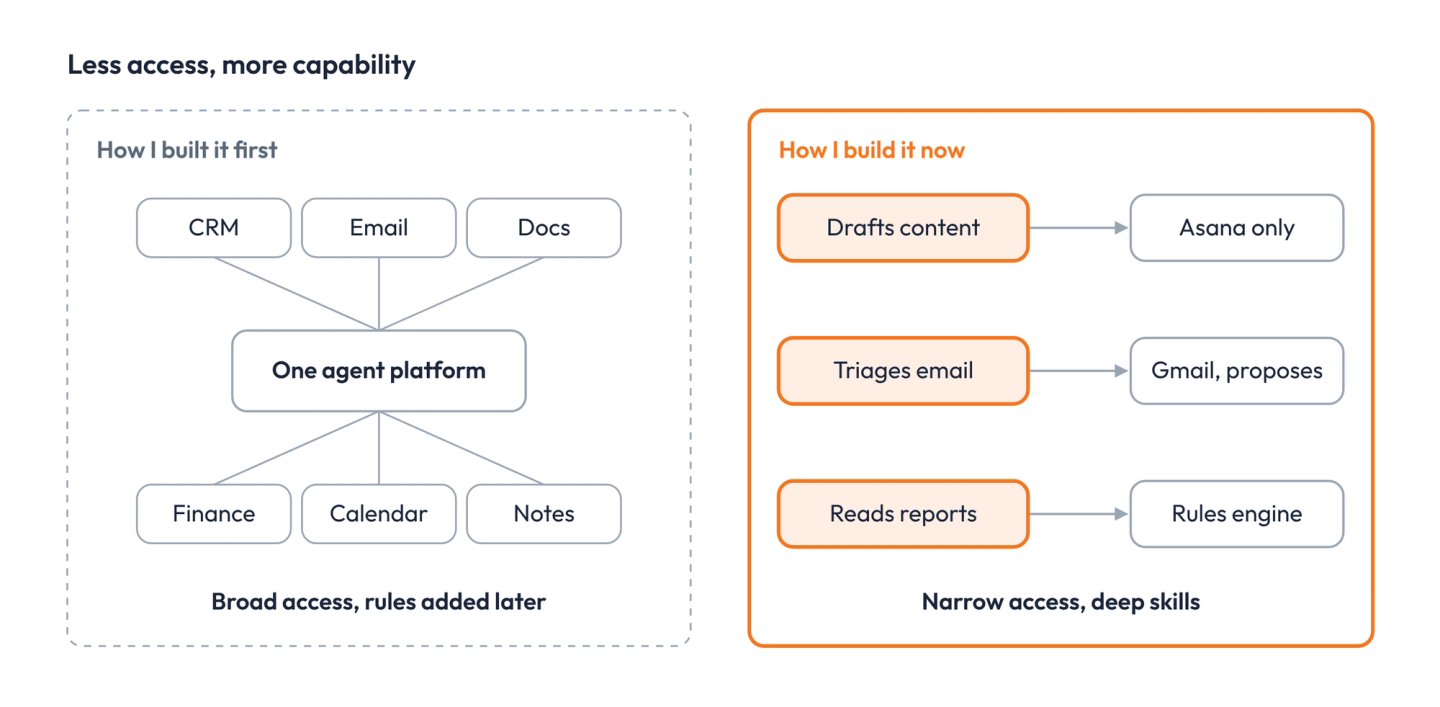
I'm not the only one who learned this the hard way. In Teleport's 2026 survey of 205 security leaders, companies whose AI had more access than the task needed reported incidents at a 76 percent rate. Where access was scoped to the task, it was 17 percent. Seventy percent said their AI has more access than a human in the same role would get. A Cloud Security Alliance study of 445 organizations found 53 percent had seen agents go beyond their intended permissions.
So the question I ask now isn't "how powerful should this agent be?" It's "how sensitive is this work, and what's the least access that still lets the agent be good at it?" The answer is different for every workflow. That's the whole point.
What I learned testing each layer#
AI tools have split into three layers, and each one sets the two dials differently. The more people a layer reaches, the less it runs on its own. I tested them roughly in reverse order, starting with the most powerful.
the orchestration layer: where I started#
This is the control plane. Many agents, coordinated, running around the clock with real permissions across systems. Paperclip, OpenClaw, LangSmith Deployment (formerly LangGraph Platform), Temporal, n8n and CrewAI all live here.
This is where the raw power is, and it's genuinely impressive. An orchestration platform can run a whole function overnight. But it's complicated, so very few people on a team can operate it, and the agents need broad permissions to be effective. Every control has to be engineered: spend limits, approval gates, audit logs, a way to pause or roll back an agent. Paperclip ships many of those. OpenClaw, by default, runs tools directly on the machine it's installed on unless you set up a sandbox.
That gap is what this layer taught me. The power comes free. The control costs work, and that work never shows up in the demo.
the agent layer: what I tried next#
This is one agent, built by a developer, with a defined job, a set of tools and scoped permissions. Claude Managed Agents, the Claude Agent SDK and the OpenAI Agents SDK live here.
The agent runs without anyone watching each step, so the controls move into the build itself: which tools it can call, what needs a human to approve, where it runs, what gets logged. The Claude Agent SDK, for example, checks every action against a fixed sequence of rules before it runs. Our Past the Pilot newsletter drafts on Managed Agents today.
What this layer taught me: one well-scoped agent is far easier to trust than a fleet. Anthropic's own team published guidance last week saying the same thing. Many enterprise agents work better as a single agent loaded with skills than as a network of specialists. One customer's single agent ran about twice as fast.
the human integration layer: where I ended up for most work#
This is AI inside the tools people already open every morning, where a person starts the work and sees the result. Claude Projects, Skills and Cowork with its scheduled tasks live here. So do ChatGPT workspace agents, Microsoft Copilot Studio, the Gemini Enterprise app and Notion's agents, which as of last week can run a single task for up to 24 hours.
The agent here mostly works with the person's own access, in the folders and apps they chose. The control is the person: they read the draft, approve the action, archive what they don't want. My own inbox works this way now. A Claude-native triage app we built, Inbox Sweep, turns each email thread into a card with a proposed next step. I decide what happens.
This was the surprise. I'd assumed the everyday tools were the beginner's option. They're not anymore. This year the vendors put workflows and agents right inside the chat window, with admin controls, role-based access and spend limits built in. For anything a person should see before it happens, this layer is now the best place to start.
How we sort workflows now#
I stopped asking which system is most powerful and started asking three things about each workflow. How sensitive is it? Does it need to run when nobody's there? How many people need to use it? Then we pick the tool whose built-in limits already match those answers.
That last part is the real shift. I used to think of security as a list of restrictions on one powerful platform. Now the tool itself is the restriction. A scheduled task inside a Claude project can only reach the apps that project is connected to. A Buffer channel set to require approval can't post without a click. Nobody has to write those rules. We just choose the tool that already enforces them.
Here's how it played out when we rebuilt our own marketing operation this month, plus one workflow I use every day:
| Workflow | How sensitive | When it runs | Where it lives now | The control |
|---|---|---|---|---|
| My email triage | High: my inbox | When I open it | Inbox Sweep, built on Claude | It proposes. I decide. |
| Research, editing and drafting for our content desk | Low: drafts only | On a schedule, unattended | Claude scheduled tasks in one project | They write cards to Asana. A person moves every card. |
| Posting to LinkedIn in my name | High: public, my voice | When approved | Buffer approval channels | One human click per post |
| Drafting our Past the Pilot newsletter | Medium | Twice a month | Claude Managed Agents | It lands as a draft. I schedule it. |
| Publishing where there's no approval button | High | Not automated yet | Held for Managed Agents | We'll move it when the human click becomes the bottleneck |
The rule across all of it is short: agents draft, people move the cards, and nothing publishes in someone's voice without that person.
One decision on that list surprised me. Managed Agents can require approval before it acts, but that approval arrives as a technical event in the background. There's no approve button in Slack. To get one, someone on our team would have to build and maintain a connector. Buffer gives us the same human click for free. So for posting, the more capable tool lost, because the simpler one had the control we needed built in.
The same idea shapes our client work. On one portfolio reporting workflow, the agent reads monthly reports in whatever format they arrive. But adjusted EBITDA is calculated by a rules engine inside the workflow, not by the model. The agent can read anything and decide nothing that matters. That's the two dials set the right way: high capability, low access.
Where the tools sit#
Rank the tools on two things, how many people they reach and how much they can do on their own, and a pattern shows up: nobody sits in the top right yet. The tools people adopt fastest run with the least autonomy. The tools that run on their own reach a handful of operators.
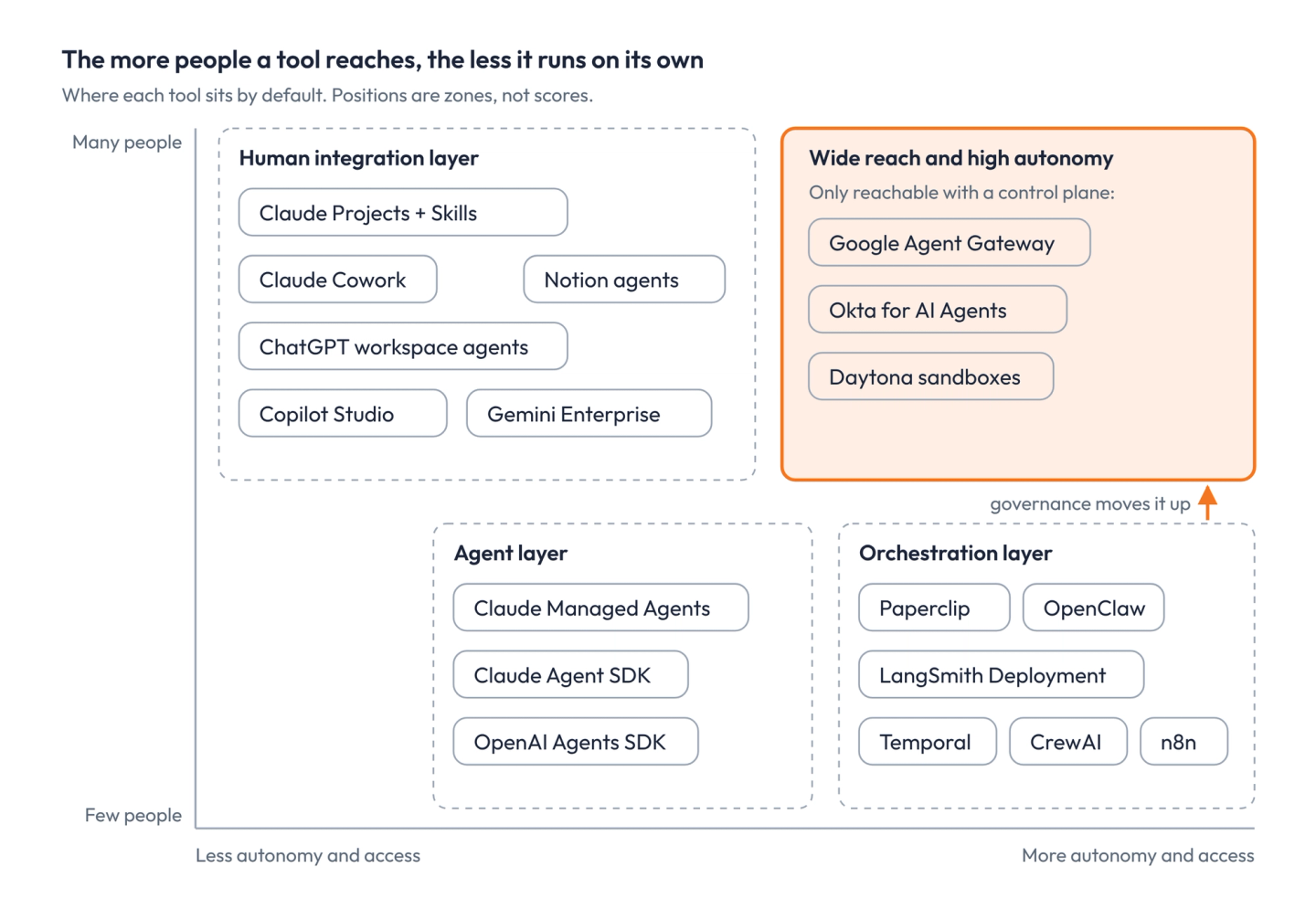
The vendors are racing toward that top right corner from both sides. Claude, ChatGPT and Notion keep giving everyday tools longer, more independent runs. The orchestration platforms keep adding approval gates, spend limits and audit logs so more people can trust them. What actually closes the gap is the governance layer underneath: giving each agent its own identity, its own sandbox and a gateway that blocks any connection it wasn't explicitly allowed. Okta reports that only 32 percent of organizations govern agents with the same scrutiny as other users, so most companies aren't there yet.
A workflow has to earn its autonomy#
The biggest change in how we work: nothing starts in the orchestration layer anymore. A workflow starts with a person doing it by hand, and it earns more autonomy one step at a time.
When I started, I'd design the automated version first and figure out the controls later. Now it runs the other way. Someone does the work in Claude by hand until it's boring. Then we write down how it's done as a skill. Then it runs on a schedule, draft-only, where a person checks every output. Only when it's repeatable and we know exactly what it should and shouldn't touch does it get its own agent, and eventually a place in Paperclip, which runs our internal operations.
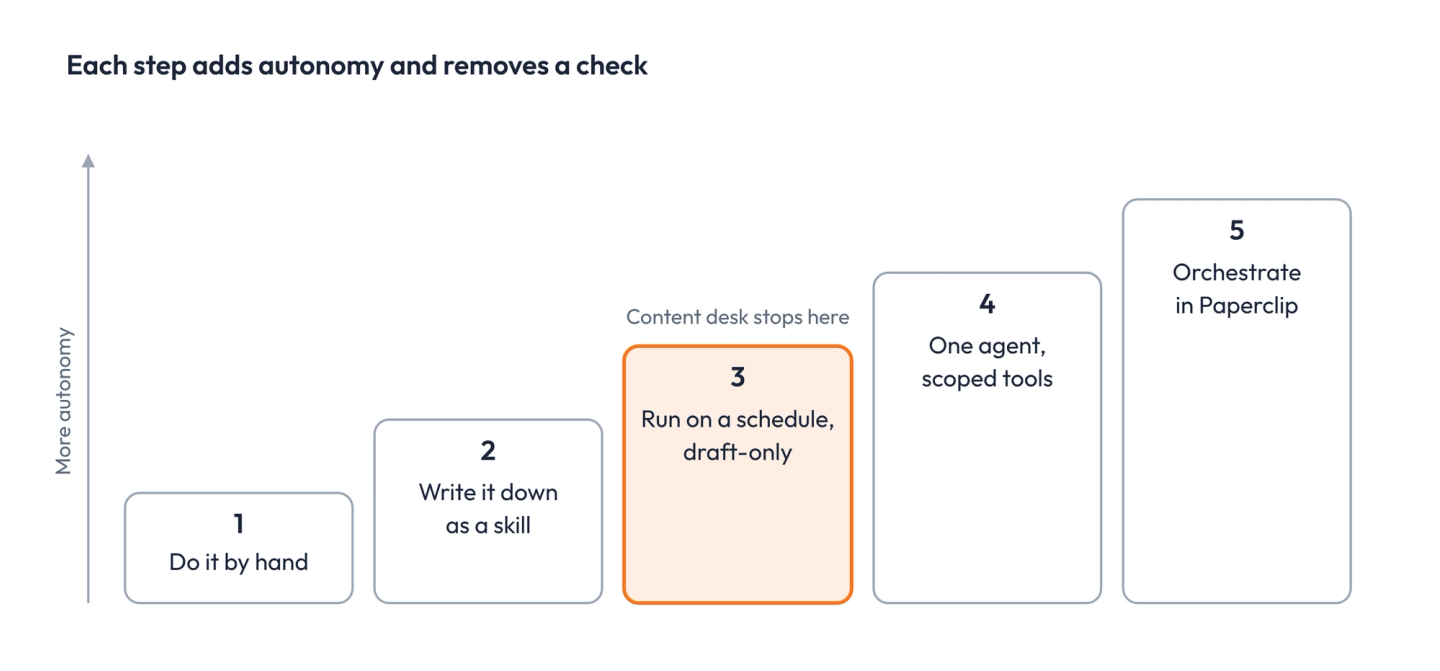
Each step adds autonomy and removes a person from the loop. So each step has to be justified by the step before it. If a workflow can't run cleanly as a draft-only scheduled task, it isn't ready for an agent that acts on its own. And most workflows never need to go all the way. Our content desk stopped at step three, on purpose.
The test I'd run before you pick a platform#
Before you choose a tool, answer four questions about the workflow itself. The answers tell you the layer, and the layer tells you most of the controls.
- What's the worst thing it could do with the access it needs? Email a customer, post in someone's name, change a number in the ledger. Write it down. That's its sensitivity.
- Does it need to run when nobody's there? If a person starts it and reads the result, it belongs in the human layer, and that person is the control.
- How many people need to use it? If it's many, it should live in the tools they already open, with the limits those tools already enforce.
- Does the tool already have the control you need? If you'd have to build the approval step, the audit log or the spending cap yourself, count that cost. Sometimes the less capable tool wins because its guardrail ships in the box.
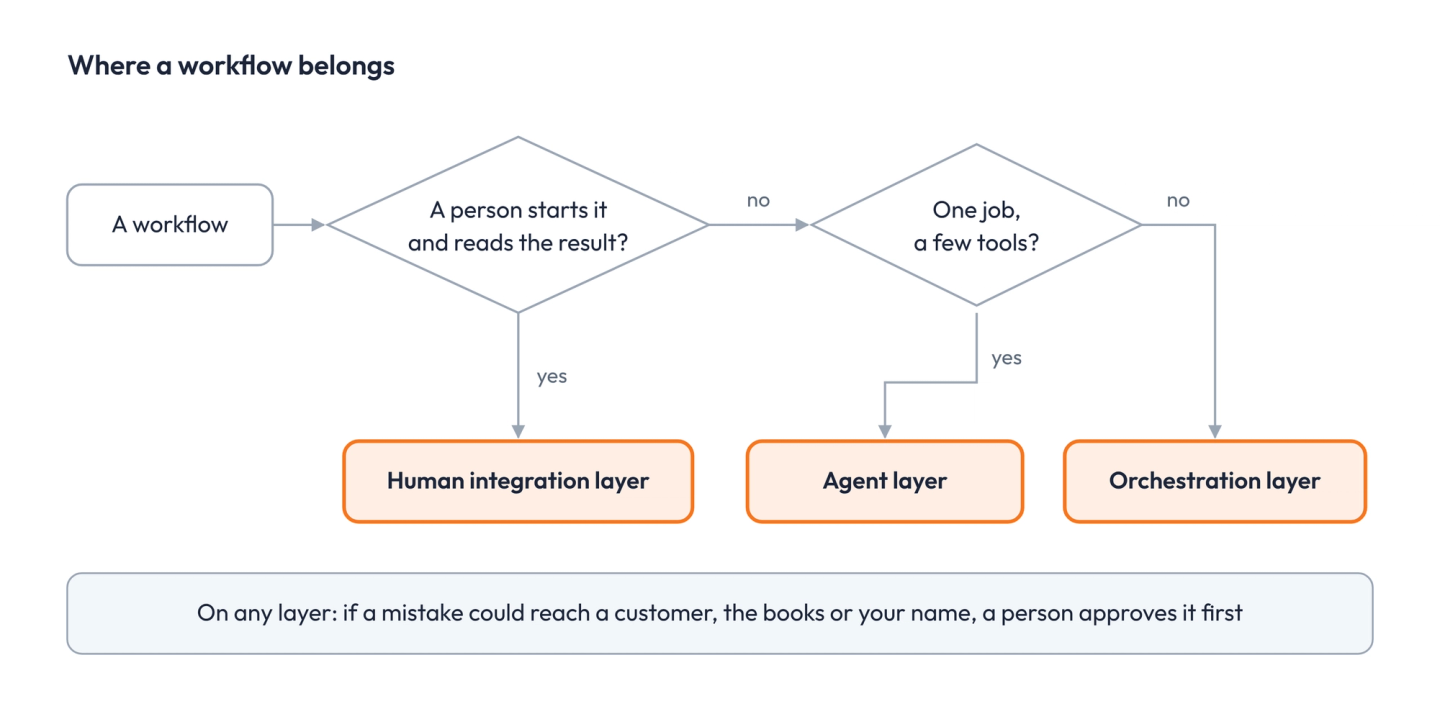
Then apply one rule. Give the agent the least access that lets it do the job well, and put the capability inside that boundary: better instructions, better skills, and a rules engine for anything that has to come out the same every time. A narrow agent that's excellent at its job beats a broad one you're afraid to leave alone.
I'm still learning this, and the tools are moving fast enough that the map above will look different in six months. But the question underneath won't change. How sensitive is the work, and what's the least access that still lets the agent be good at it?
Sources#
- Teleport, 2026 State of AI in Enterprise Security
- Cloud Security Alliance, AI agent scope violations study
- Okta, Businesses at Work 2026, via SecurityBrief
- Anthropic, When to fold subagents into your main agent loop
- Claude Agent SDK permissions
- Claude Managed Agents
- Claude Cowork
- ChatGPT workspace agents
- Notion release notes, October 19, 2026
- Google Agent Gateway
- Paperclip on GitHub
- OpenClaw on GitHub