

I built the same agent twice this year.
The first version ran on the Claude Agent SDK. I owned the process, the sandbox, the session files, the retries, and the failure at 2am that nobody noticed until Monday. The second version runs on Claude Managed Agents. Anthropic runs the harness. I own the prompt, the tools, and the approval button.
Both versions work. The difference between them isn't "hosted versus self-hosted." It's who gets paged when something breaks, and whether your data is allowed to leave the building.
Here's how I think about the choice now, after shipping on both.
the payroll question
The Agent SDK is running payroll yourself. Managed Agents is handing payroll to a provider. Same employees, same approvals, same signature. What changes is who runs the system and who takes the call when something fails. You keep the data and the decisions either way.
Every operating company has made this decision once already. You can run payroll in-house: the tax tables, the filings, the person who has to be awake when a deposit fails. Or you hand it to a provider who runs the system and gets the call when a filing bounces.
The Agent SDK gives you the loop that powers Claude Code as a Python or TypeScript library, with built-in tools, hooks, subagents, permissions, sessions and MCP connections. It runs in a process you operate. If you can run a container, you can run an agent, and you own everything around it.
Managed Agents runs that same loop on Anthropic's infrastructure. Each run gets a sandbox, a durable session that survives disconnects, credentials held outside the sandbox, scheduled execution with no cron box to maintain, and a console that shows every tool call and what it cost. It went into public beta in April. The price is standard token rates plus eight cents per active session hour.
The analogy has a limit, and it's the most important part of this post. A payroll provider gives you the whole system. Managed Agents gives you the agent and nothing else. More on that below.
six words that do the design work
Managed Agents is built from six objects: agent, environment, session, events, vaults and outcomes. Each one answers a question an operating partner already asks about any production system. Once a team uses those six words, design conversations get shorter. That alone was worth the migration.
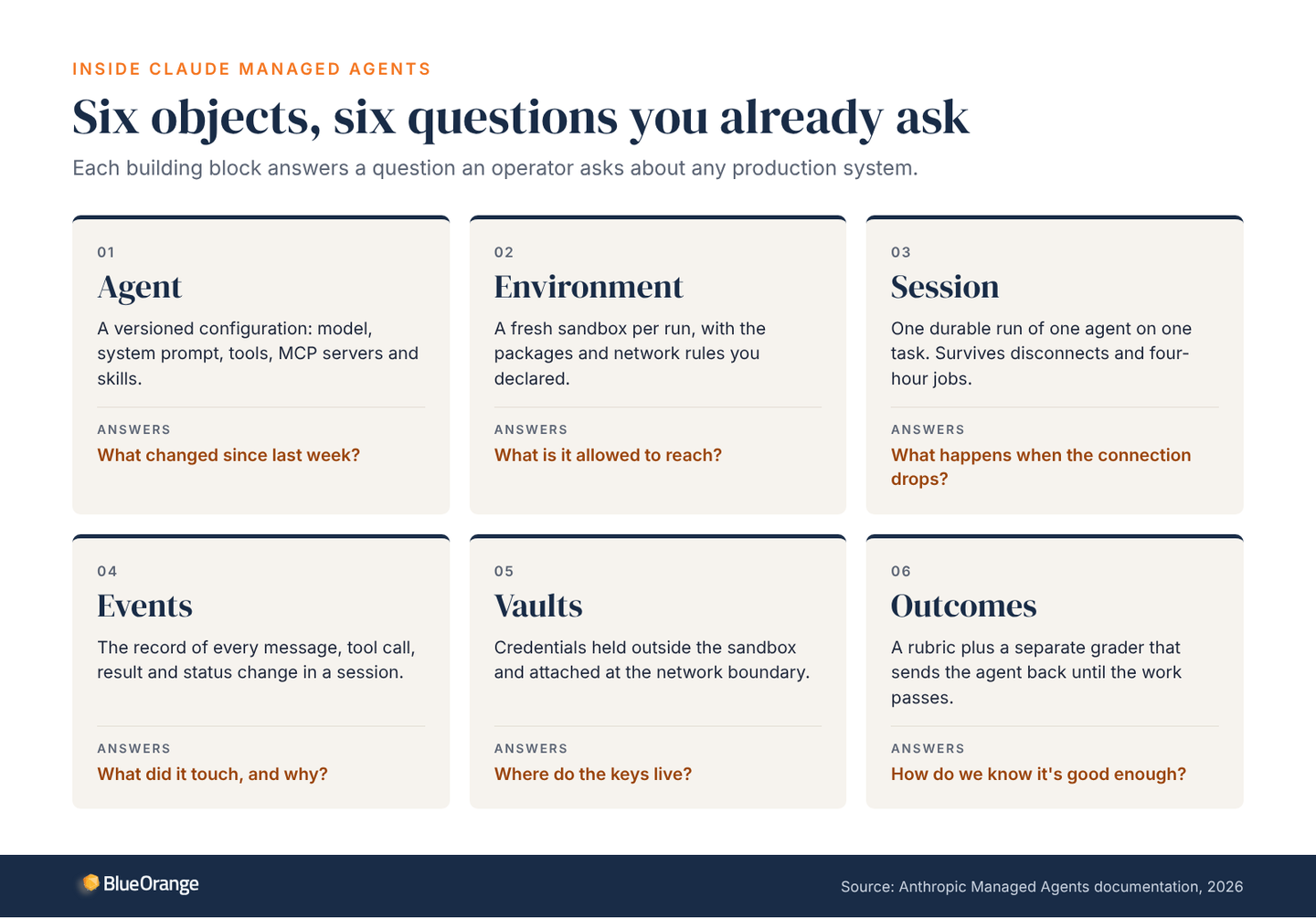
An agent is a versioned configuration: the model, the system prompt, the tools, the MCP servers and the skills. Versioned means you can diff it and roll it back, so "what changed since last week?" has an answer.
An environment is the sandbox. Each session gets a fresh Linux container with the packages and network rules you declared, and the agent can't reach a domain you didn't allow. Anthropic hosts it by default. Self-hosted sandboxes, in public beta since May, move tool execution and files inside your perimeter, while the agent loop stays on Anthropic's side.
A session is one run of one agent on one task, and it's durable. If the client disconnects or the job takes four hours, the session is still there and still resumable. That piece used to cost a platform team a quarter to build properly.
Events are the record of everything inside a session: every message, tool call, result and status change. When compliance asks what the agent touched and why, the answer is a query instead of a reconstruction.
Vaults hold credentials. The sandbox sees a placeholder, and the real key is attached at the network boundary, only for the domains you approved. Rotate a key and running sessions pick it up on their next call. No API key in a prompt, no shared secret in a repo.
Outcomes define "done." You write a rubric, and a separate grader in its own context scores the work and sends the agent back until it passes. Anthropic reports that in its testing this improved task success by up to 10 points over a standard prompting loop, with the biggest gains on the hardest problems. It's a quality gate that doesn't need a person to read every output.
what it looks like running
Our weekly content pipeline runs on Managed Agents: six agents and one human. It runs on a schedule Anthropic operates, a pass costs cents, and every step is visible in the console. The only part I touch is a card in Asana with three buttons.
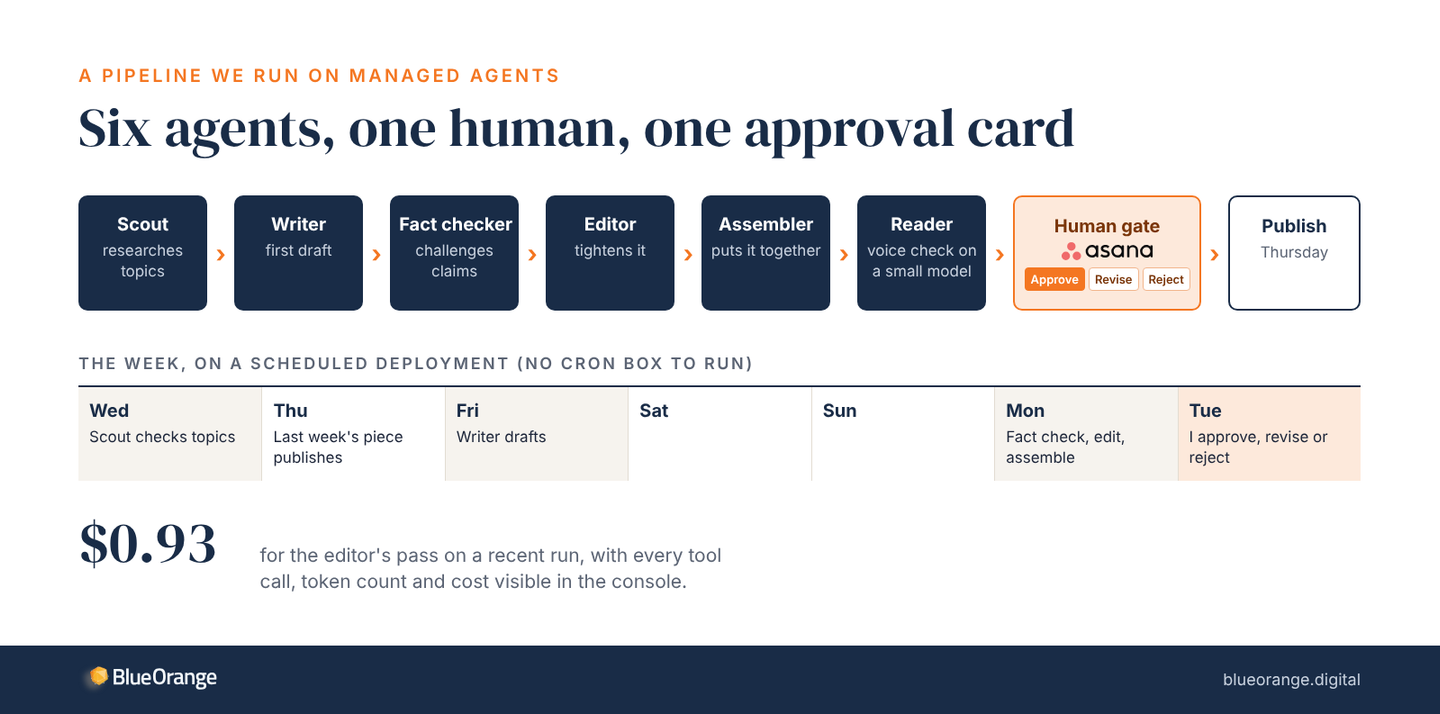
A scout researches topics midweek. A writer drafts on Friday. On Monday a fact checker and an editor work it over, an assembler puts it together, and a reader on a small model checks the voice. On Tuesday I get the Asana card: approve, revise or reject. On Thursday it publishes.
The schedule is a scheduled deployment, which is a cron expression Anthropic runs. Each firing opens a new session. I can pause it, resume it, or trigger a run by hand. I didn't build a scheduler, a queue or a retry policy. The editor's pass on a recent run cost 93 cents, and I can open the console and read every step it took, with the tokens and cost of each one.
the cost shape
Runtime is the small number. At eight cents per active session hour, an agent working 20 hours a month adds $1.60. Run one around the clock and it's about $58 a month. Tokens are what you budget, and the console shows them per session, so an agent's unit economics become a line in a budget.
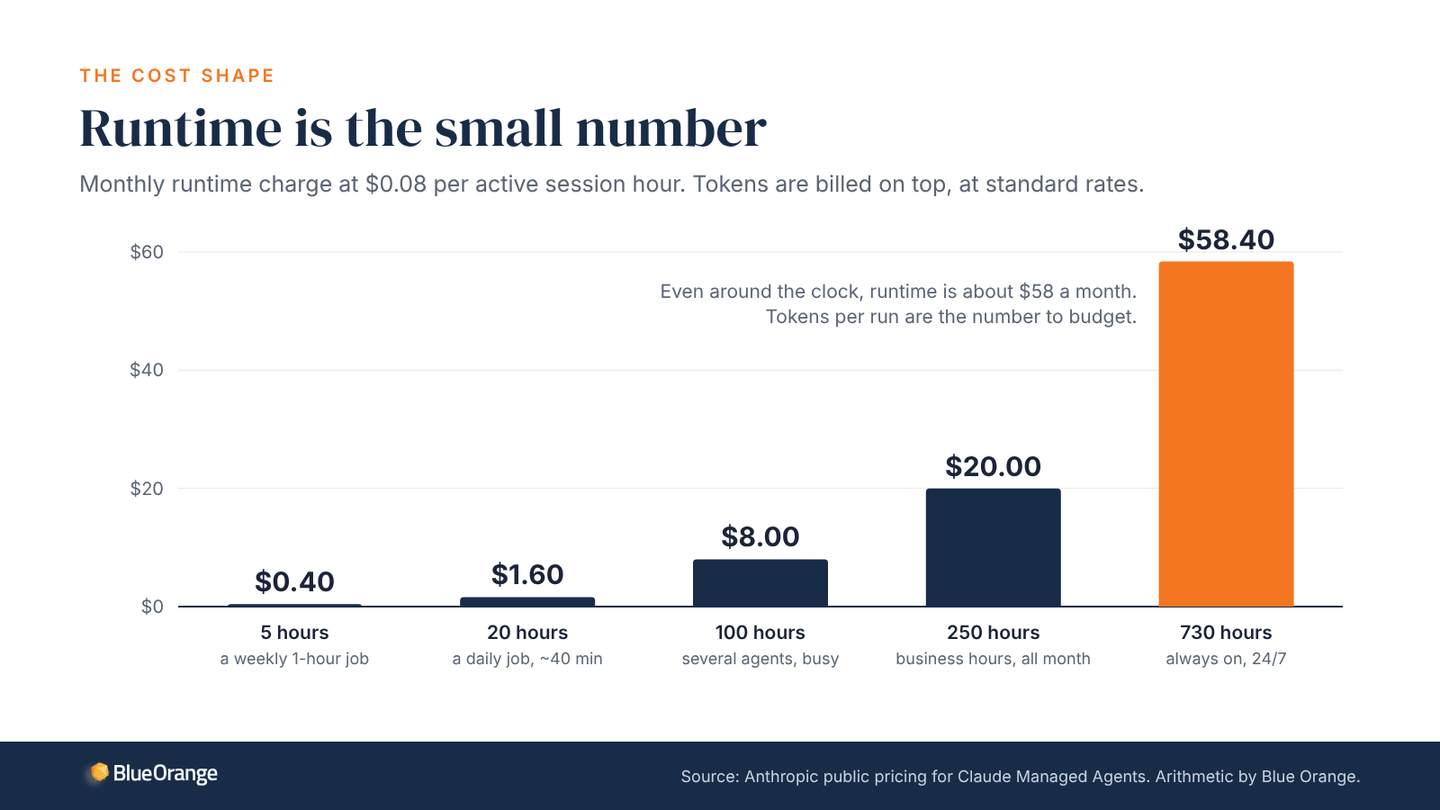
Operating partners ask about cost first, so here's the shape of it. For most workloads the tokens dominate and the runtime is a rounding error. The number to watch is tokens per run, and because the console reports it for every session, you can see which agent is expensive and why before the invoice tells you.
what it doesn't give you
Managed Agents supplies the agent, not your application. The runtime owns the loop, the sandbox, the session and the secrets. You still own the data store, the integrations, the approval surface and the app the business sees. If a vendor tells you the hosted runtime removes the need for engineering, ask where the state lives.
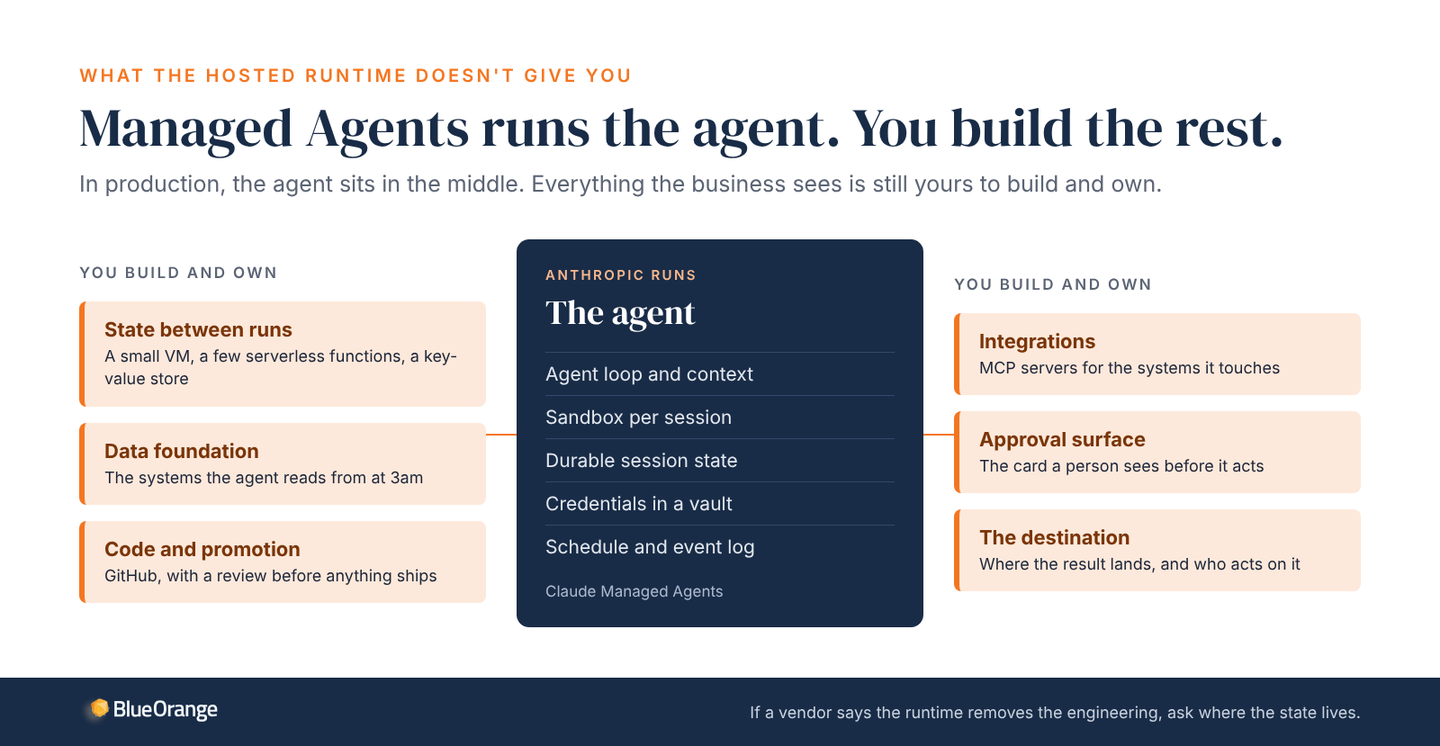
This is where the payroll analogy breaks. Our pipeline still needed somewhere to keep state between runs, because the agent doesn't persist anything on its own. So there's a small virtual machine, a few serverless functions, and a key-value store holding this week's topics and the finished draft. There's GitHub for the code, the newsletter platform for publishing, and Asana for the human gate. That agent-plus-compute pattern is what production looks like.
It's also a beta, and things will change under you. Outcomes and multiagent orchestration have been in public beta since May. Custom tools arrive through MCP servers, so if the system you need to reach doesn't have one, you're writing it, and private tunnels to MCP servers inside your network are still a research preview. Plan for change: version the agent, keep the review gate in front of anything that ships, and read the release notes before you promote.
where the SDK still wins
I'm not retiring the SDK. It's the right answer when your data can't leave your perimeter, when the agent lives inside something you already run, or when you're still figuring out what the agent should do.
Data first, because it matters most to the companies we work with. Self-hosted sandboxes help, but the agent loop and session state still run on Anthropic's side. For a healthcare billing platform or a fund with LP data, that can end the conversation, and it should.
If the agent belongs inside a CI pipeline, a data platform job or an internal service, the SDK drops in as a library. Managed Agents is a service boundary, and every tool call crosses it.
And if the spec is still moving, the SDK's loop is faster. You see every message and you can set a breakpoint. Nothing's more expensive than a production harness wrapped around a prompt you haven't finished thinking about.
Here's the whole comparison in one place.
| Agent SDK | Managed Agents | |
|---|---|---|
| Where it runs | A process you operate, on your infrastructure | Anthropic's infrastructure; the sandbox can be self-hosted |
| Session state | Files you store and manage | Durable and hosted; survives disconnects |
| Credentials | Live in your process | Vault, attached at the network boundary |
| Scheduling and recovery | You build it | Scheduled deployments, included |
| Audit trail | Whatever you log | Event log of every message and tool call |
| Quality gate | Your own evals | Outcomes: a rubric and a separate grader |
| Iteration speed | Fastest: breakpoints, every message visible | Slower: each tool call crosses a service boundary |
| Cost | Tokens plus your hosting | Tokens plus $0.08 per active session hour |
| Best for | Prototypes, data that must stay home, agents inside CI or a platform | Long-running, concurrent or scheduled production work |
the decision in three questions
Three questions settle it: what stage the workflow is at, where the data must sit, and how it runs. Prototypes and data that has to stay home go on the SDK. Long-running, concurrent or scheduled work you'd rather not operate goes on Managed Agents.
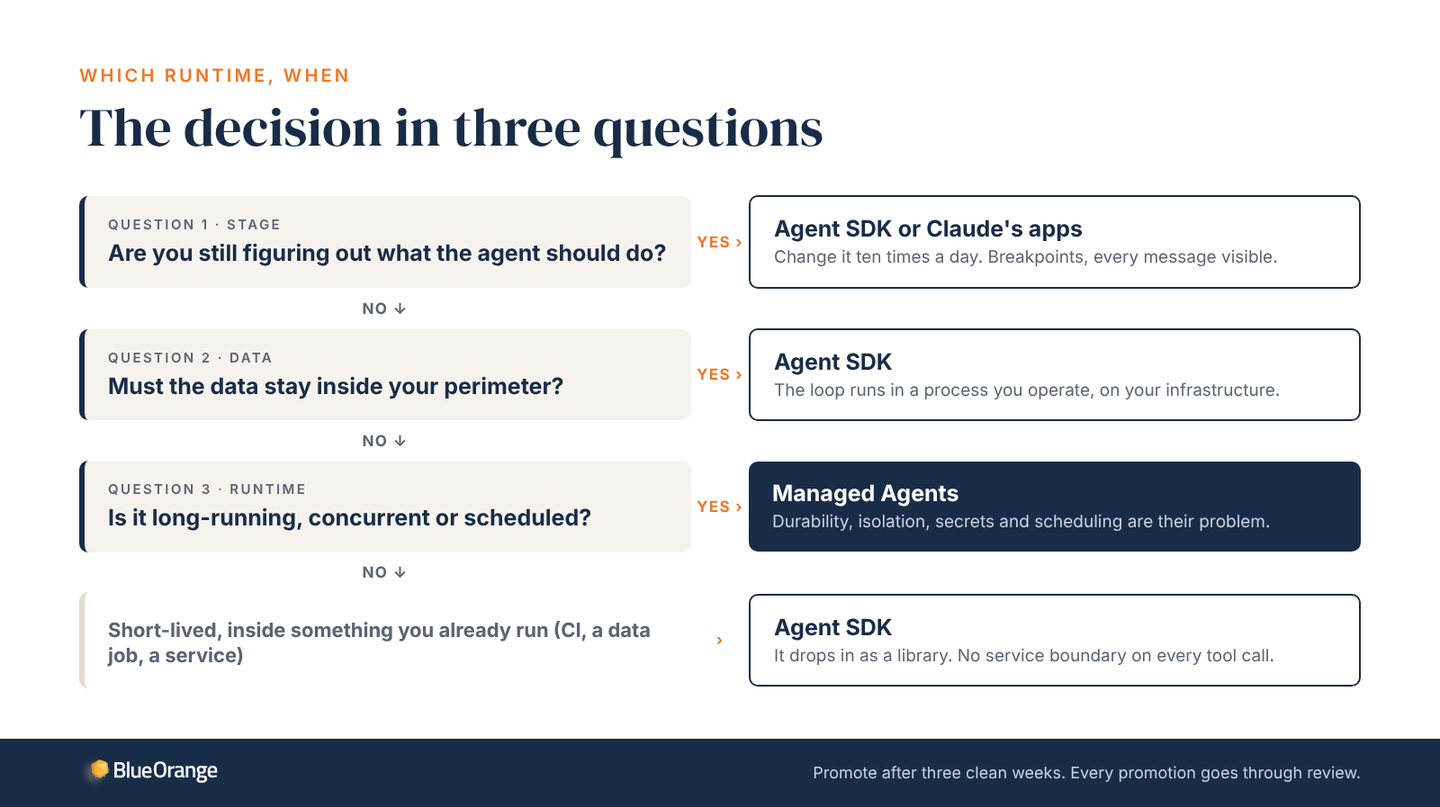
When a client asks which one to use, I ask three things back. Are you still figuring out what the agent should do? Then it belongs on the SDK or in Claude's own apps, where you can change it ten times a day. Must the data stay inside your perimeter? If the answer is "here," you have your answer. Is it long-running, concurrent or scheduled? Then it belongs on Managed Agents, because those are exactly the problems you don't want to solve yourself.
Our own pattern is simple. We prototype on the SDK or inside Claude's apps. When a workflow has run cleanly for three weeks, we promote it to Managed Agents with a schedule, a vault and an approval gate. Promotion goes through GitHub, so nobody pushes an agent to production without a review. I'd carry that rule to any team, on any runtime.
if you're buying, not building
Most readers won't write the harness. They'll hire someone who does or buy a product that embeds one. So the useful question isn't "can you build us an agent." Anyone can build an agent. Ask the vendor to show you five things instead.
| Ask to see | Why it matters | Where it lives on Managed Agents |
|---|---|---|
| The agent's version history | Answers "what changed?" when a run looks different | Versioned agent configuration |
| The environment's network rules | Shows exactly what the agent can reach | Environment definition |
| One session's event log | Shows what it touched, and why | Events |
| Where the credentials live | No keys in prompts, no secrets in repos | Vaults |
| The rubric for "good enough" | Quality without a person reading every output | Outcomes |
Those are the questions you'd ask of any production system in a portfolio company: what changed, what can it reach, what did it touch, where are the keys, and who decided the work was good enough. A year ago they were hard to answer. On Managed Agents each one maps to an object you can open in the console. If a vendor can't show you those five things, they have a demo, not a system.
For a PE-backed company that wants agents in finance, reporting or client operations, that changes the economics. The runtime is a utility bill. The engineering is in the application around the agent and the data foundation underneath it, which is where it should have been all along.
Where does this break down for you? I'm curious what teams are hitting that I haven't.
Book an architecture review if you want a second opinion on which runtime fits a workflow you're scoping. We've shipped on both, and we'll tell you which one we'd pick and why.